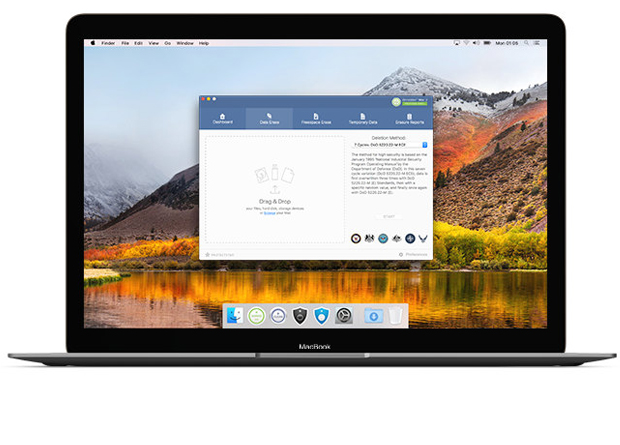
ProtectStar released the update version 2.0.10 of iShredder Mac, their military grade data deletion tool for macOS. The app allows users to drag-and-drop files, folders, hard drives, an external drives to the app’s shredding area and securely erase the data with just a click of the “Shred” button. The new update is also fully compliant with the European privacy legislation (GDPR) and compatible with the latest macOS Mojave.
Using the same data shredding techniques as their popular iShredder iOS app to wipe iPhone and iPad devices, ProtectStar’s iShredder Mac securely erases data using secure erasure algorithms that meet and exceed government, military, and industry standards. The software eliminates any chance for data reconstruction, even by government agencies.
“Many users believe that when they delete a file from their Mac, that they’re gone for good. The truth is, the files can be recovered using any one of a number of macOS disk utilities. That’s due to the way computers “delete” files. They don’t really remove the data, they simply mark the files as deleted,” says Chris Bohn, CEO of ProtectStar. “Files aren’t really gone forever until that storage space is overwritten using secure deletion algorithms. iShredder Mac securely overwrites the ‘deleted’ files using patented security standards, making it impossible to recover any deleted data.”
The latest version of iShredder Mac 2 includes a new innovative search algorithm to detect and clean up useless temporary junk data, caches, macOS snapshots, and log files on the Mac. With just a push of a button, iShredder Mac not only brings back valuable storage space to any Macbook or iMac, it also ensures a performance tuning. This ensures that the files that contain fragments of your personal data are erased.
iShredder Mac 2 is available in two versions. The Professional Edition offers 11 different data shredding methods, completely wiping all free space and overwriting the storage area, to completely shred all of the stored data. The iShredder Mac Military Edition offers 18 erasing methods in total, while also offering advanced deletion reports.
iShredder Mac Professional uses certified deletion algorithms, including: DoD 5220.22-M ECE, Peter Gutmann, DoD 5220.22-M, HMG Infosec No.5, German BSI-2011-VS, US Army AR380-19 and more. iShredder Mac Mac Military Edition uses those same algorithms. Plus, it makes use of enhanced military deletion methods like NATO standard, US Navy NAVSO P-5239-26 (MFM & RLL), USAF AFSSI-5020, BSI TL-03423 and CSEC ITSG-06. Each algorithm has been analyzed by independent authorities and organizations to ensure it really does what it promises, which is destroy data beyond any hope of restoration.
iShredder Mac Professional Edition features include:
- Compatible with all Mac models
- Secure Erasure of files, folders, hard drives, external drives, USB Sticks, SD cards, and more
- Secure data deletion up to the top-secret security standard level
- A detailed deletion report provides evidence of deletion
- Compatible with Solid State Drives (SSD) and Flash memory
- Wiping of Temporary Data and macOS Snapshots
- Full Drag & Drop support
- Includes 1 year of technical support and free upgrades
- 24/7 support via e-Mail with your personal Support Hero
iShredder Mac Military Edition includes the above features, plus:
- Advanced erasure reports
- Enhanced military deletion methods
Both editions have integrated the high-secure Advanced Secure Deletion Algorithm developed by ProtectStar Inc. in 2017. The new deletion method also encrypts the blocks completely using the 256-bit AES (Advanced Encryption Algorithm) and uses high-quality random numbers generated based on Feder Information Processing Standards (FIPS).
System Requirements:
- macOS 10.11 or higher
- Supports Mac OS X El Capitan, macOS Sierra, High Sierra, Mojave
- 64-bit processor
- 50 MB
- Internet connection for activation and updates