A new App called Stk N Snap App controls cell phone cameras to take “groupie” and “super selfie” photographs. Presently, selfies are taken at arm’s length or with extension devices. Now, a person can place a phone on a wall or stand it on a desk and have the Stk N Snap App take control of the number and timing of photographs. A person can step back into the picture and let the app take control.
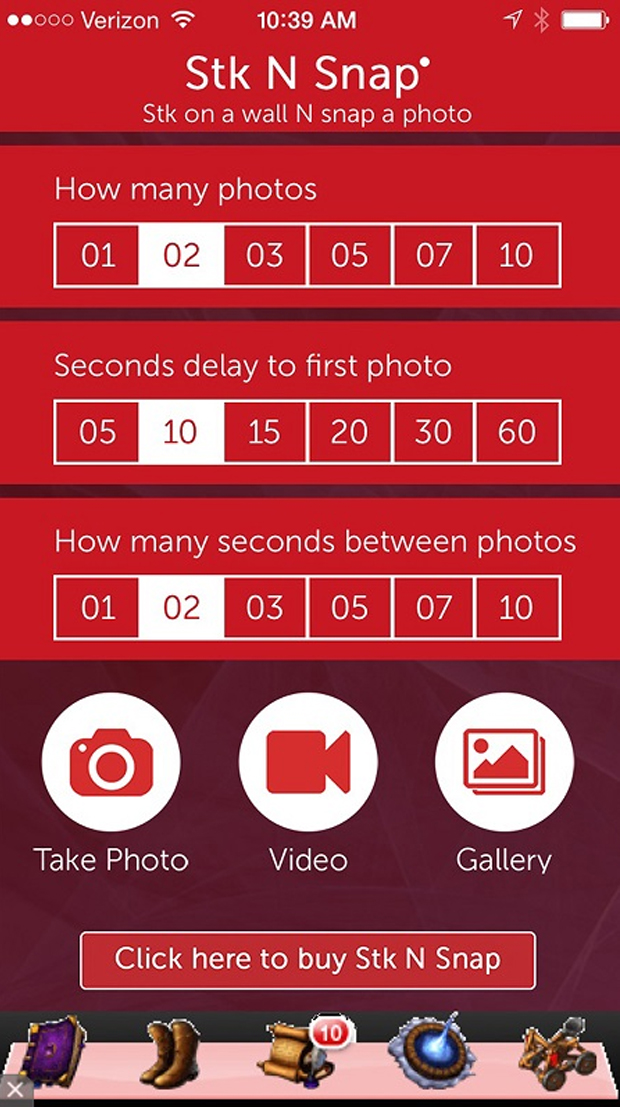
In addition, Stk N Snap App controls video by setting a delayed start and video duration. Video and photographs are easily taken of family time with kids, family holidays, school functions, practice speeches, see how a golf swing looks or just being crazy.
Stk N Snap app controls a cell phone camera. It allows a person to step back and get in the photo or video.
The app controls:
Photos:
1. Set a time delay before a first photo is taken
2. Set the number of photos to be taken
3. Set the amount of time between photos
Video:
1. Set a time delay before a video recording starts
2. Set how long a video will last
Stk N Snap App opens a cell phone camera when the “take photo” button is pressed. A start/cancel button allows the phone to be properly positioned before taking photographs. The cell phone front or back camera and flash are controlled from this camera view. When the start button is pressed, a timer counts down to the first exposure and appears before each subsequent exposure. When all the exposures are complete, one can view or share photos when the gallery button is pressed while still in the App. Photos are stored on the camera so there is access to them without using the App.
Stk N Snap App opens a cell phone camera when the” take video” button is pressed. A start/cancel button allows the phone to be properly position before taking a video. Pressing the start button starts a countdown to the video. The duration of the video is set but can be stopped at any time.
Stk N Snap App is available now through Google Play and Apple Store/iTunes.
Both Stk N Snap and Stk N Snap App can be seen at http://www.stknsnap.com.