Canon Marketing Philippines announced six new additions to the imageRUNNER (iR) multi-function device (MFD) line-up, which includes four A3 monochrome MFDs, the iR2645i, iR2635i, iR2630i and iR2625i, as well as two A4 monochrome MFDs, the iR1643i and iR1643iF.
Built to meet the needs of modern-day offices, the entry-level MFDs help businesses increase productivity with seamless mobile connectivity, supporting a wide range of mobile printing solutions including Canon PRINT Business, Google Cloud Print, Apple AirPrint and Mopria Print Service.
“Today’s fast-paced and agile working environment paves room for enterprises to improve systems and processes, most especially securing valuable data and information. What our new imageRUNNER MFDs promises is to be able to fully adapt to today’s swift workforces through providing top-of-the-line security features that not only safeguards data, but begins from preventing unauthorized access on the onset of scanning documents. With a strong cloud technology, transferring of data and accurately monitor cost efficiency of processes,” said Yasuhiko Shiraki, Business Imaging Solutions Director, Canon Marketing Philippines Inc.
Engineered to Excel in Modern Office Environments
Comprising iR2645i, iR2635i, iR2630i and iR2625i, the highly efficient iR2600i series offers remarkable print speeds of up to 45 pages per minute (ppm), and various smart capabilities to improve user convenience and productivity in modern offices. Incorporating a unique Forced Hold Print function, the MFDs allow users to preview and edit print settings before finally releasing temporarily held print jobs. This helps to reduce paper wastage from accidental prints, and save users the hassle of re-submitting print jobs.
Supporting greater security, the new iR2600i series proactively deters data breaches by integrating with third party Security Information and Event Management (SIEM) system to provide insights into potential threats. Featuring a new Syslog protocol, the MFDs send device information to the SIEM system for monitoring, and upon detection of unusual activities, the system sends real time alerts to administrators for immediate threat analysis and prevention.
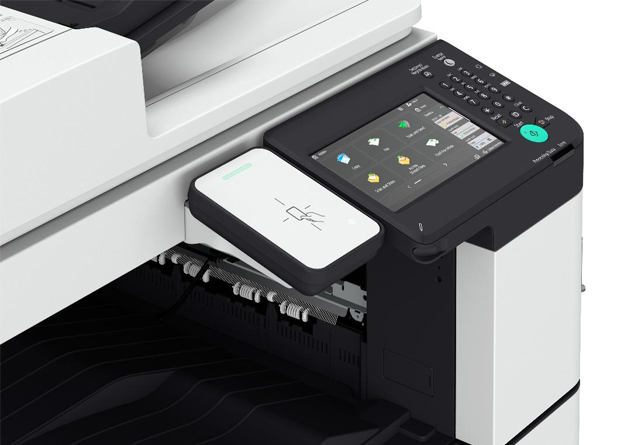
Aimed at providing users with greater ease of use, the MFDs present a new user interface (UI) known as the Home Screen on a large 7-inch color touchscreen LCD. The UI offers a new timeline feature which displays shortcuts for past or repeated scan and copy jobs, helping users avoid the inconvenience of repetitive operations. The MFDs also provide users with the ability to customize preferences, offering personalization of initial display screen, display language and frequently-used functions for added convenience.
Set to Aid Businesses Streamline Document Workflows
Pre-installed with Application Library, the new iR1643i and iR1643iF host a range of shortcuts designed to help users streamline workflows and work faster. Users can customize the MFDs to automate routine tasks according to specific work requirements, and convert multiple steps into a one-step operation for achieving maximum efficiency. The productive MFDs also feature a swift printing speed of 43 ppm, and high-capacity paper feed of up to 2,300 sheets to help busy offices breeze through heavy workloads. Built with a 5-inch color touchscreen LCD, the MFDs provide a great user experience with easy navigation across the intuitive UI. The display of simple icons in a clean layout and smartphone-like virtual QWERTY keyboard provide users with superb ease of use.