








































































Workers wondering where their time goes should look at how they manage emails, new research suggests. In a Robert Half survey, chief financial officers (CFOs) said 17% of the time they spend on work email is wasted.

While spam is the primary culprit, according to 39 percent of respondents, the research identified other distractors, including being copied on irrelevant emails, as well as wading through rambling messages and those that could be better delivered another way.
CFOs were asked, “What is the percent of time you spend on work-related emails that you consider to be wasted?” The mean response was 17%.
CFOs were also asked, “What is the primary time-waster when it comes to email?” Their responses:
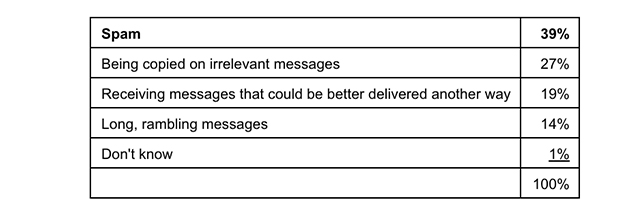
“Spam can be addressed by using filters and technology to prevent unwanted email,” said Paul McDonald, senior executive director for Robert Half. “But the other issues often boil down to good judgment.”
McDonald added, “Keeping your messages short, relevant and actionable will improve the chances your emails are read and responded to quickly.”
Robert Half offers six email etiquette tips your colleagues will appreciate:
- Be cautious about who you copy. Does the person you’re copying need to review the message? Is action required of them? Use “Reply All” as a last resort. Don’t waste your time or the time of recipients who don’t need to read the email message.
- Go on a word diet. Efficiency and brevity should drive your approach to sending email. As often as possible, keep it under two paragraphs. Longer emails take too long to digest, and you could lose your audience.
- Save the detective work for Sherlock. No one likes to read through a long email thread to find out what the sender wants and why you are being copied. Summarize the issue and what is needed at the top – and provide the string as background.
- Send less, sift less. Resist the urge to respond immediately, especially if it’s a request that may resolve itself without your input. Consider “email-free Fridays” for internal communication, of course allowing for email from outside vendors and customers.
- Make the subject line count. Use a subject line that’s direct and to the point. Do you need a reply? Try using “RSVP” within the first three words. Otherwise, let recipients know immediately what action is required (e.g., “For your review” or “Meeting rescheduled”) so they get the gist and prioritize their response accordingly.
- Watch your tone. Email is the equivalent of a hard-copy business memo. It’s an official record and should be written with the same professionalism. Check spelling and grammar, and read it aloud to yourself before you click send. The few extra minutes for review will give you another chance to fine-tune the message’s content and tone.