A BETA version of KidslockWindows.com is being released in the Windows store. An App that provides a security system for parents to oversee their children’s activity on the computer has never before been offered for the Windows platform.
The idea for this App was created by a parent of two young children with multiple Windows-based computers in their home. He struggled himself to monitor his children’s computer activities, and imagined creating a platform that would allow him to decide which programs and activities his children could access on their home computers. With over 200 million copies of Windows 8 sold, the software is now a central part of more than 1.5 billion people around the word. Unfortunately, the Windows platform is missing a critical safety measure for percentage of its customers.
Ryan Saville, founder of KidsLockWindows.com, wanted to solve the issue: “We need a simple solution that will protect our children when using tools like the Windows Store. I enjoy my kids playing on the computer, I just want to have better control on what they see and do.”
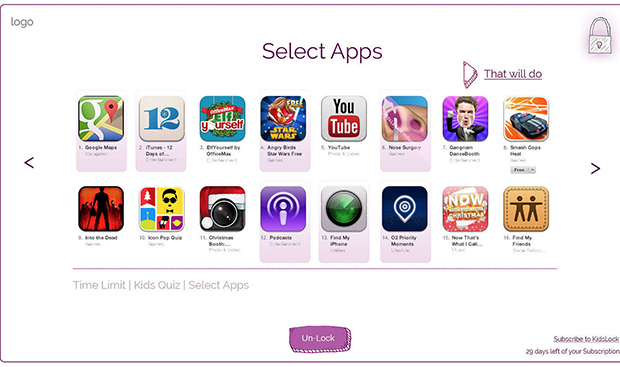
Thus KidslockWindows.com was born, both out of necessity but also out of need. KidsLockWindows.com will be the first software of its kind focused on providing a ‘Kiddie Lock’ lock for parents. Saville states: “Imagine a clean white interface, showing large icons with a simple timer that counts down and locks after a certain time period, giving peace of mind back to parents but still allowing our little ones to still grow their necessary computer skills.” In the future the company expects the software to be subscription similar to an antivirus.
Microsoft has established a “Family Mode” within the platform allowing you to block or allow specific websites where as KidsLockWindows.com wants to provide a ‘security blanket’ over the entire operating system allowing parents to just show the icons or educational games you want your child to use.
Presently, the company is searching for parents that want to become BETA testers to help trial this new software the registration is open until May 21st, 12:00 PM. Visit KidslockWindows.com to join the BETA test.