
































































Spotify users around the world have soundtracked their everyday moments by creating nearly 9 billion playlists. Now, Premium users in the Philippines can take their creativity to the next level with the ability to add and customize transitions between tracks.
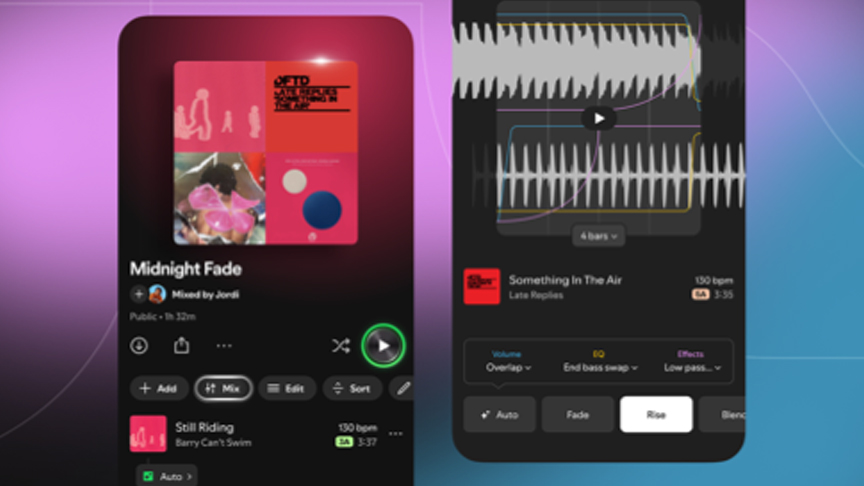
The feature Mix, now in beta, gives users even more control—allowing music lovers and playlist experts alike to easily create unique playlists. Seamlessly transition between tracks, customize how they flow together, and enhance your mix with features like volume, EQ, and effect curves.
Ready to mix things up? Make your playlist your own with seamless transitions.
-Open a playlist you’ve already created, or make a new one.
-Select “Mix” from the toolbar and see your playlist change.
-Start with “Auto” for an instant blend, or tap to customize your mix and create unique transitions that fit your style.
-When customizing, choose a preset like “Fade” or “Rise” to easily apply different transition styles.
-Experiment with specific settings for volume, EQ, and effects, and use the waveform and beat data to find the best spot in each track for your transition.
-Hit “Save,” then listen to your unique playlist. Share it, or even collaborate on a mixed playlist with friends who are also Premium users.
You can toggle the mix on and off at any time by pressing the “Mix” button.
New to audio mixing? These simple tips will help you level up your playlist.
Match tempos and keys: For the most natural-sounding transitions, choose songs with similar tempos and Camelot keys. When you tap “Mix,” we’ll automatically show the key and BPM (beats per minute) for each track, so you can easily scan and reorder to help your playlist flow more smoothly.
Start with transition-friendly genres: Mixing works best with music produced for seamless transitions. Dance genres like house and techno tend to blend more smoothly.
Consider the energy: Think about the mood and energy you want your playlist to have. Plan your song order to gradually build up or wind down the energy, guiding listeners through an emotional journey.
Tap into your best playlists: Mixing is perfect for moments when you want to avoid awkward pauses. For example, upgrade your running playlist for consistent BPMs to set your pace, or curate the ideal road trip or party playlist to keep the vibe going.
Visualize it: Make your playlist even more unique by creating your own cover art with new stickers and labels, available only for mixed playlists.
With custom transitions in playlists, Spotify empowers users to shape their listening experience and express themselves through the music they love. To access this feature, ensure the Spotify app is updated to the latest version.