Living in the modern world often involves creating and preserving memories of your day using smartphones. This includes taking photos, particularly at night. Night shots provide a therapeutic experience for those passionate about mobile photography.
City lights and heartwarming nighttime views bring a sense of delight to many individuals, including Gab Mirandilla.
Gab is currently a creative designer. In addition to his professional work that involves photography, he also enjoys capturing breathtaking views during the nighttime.
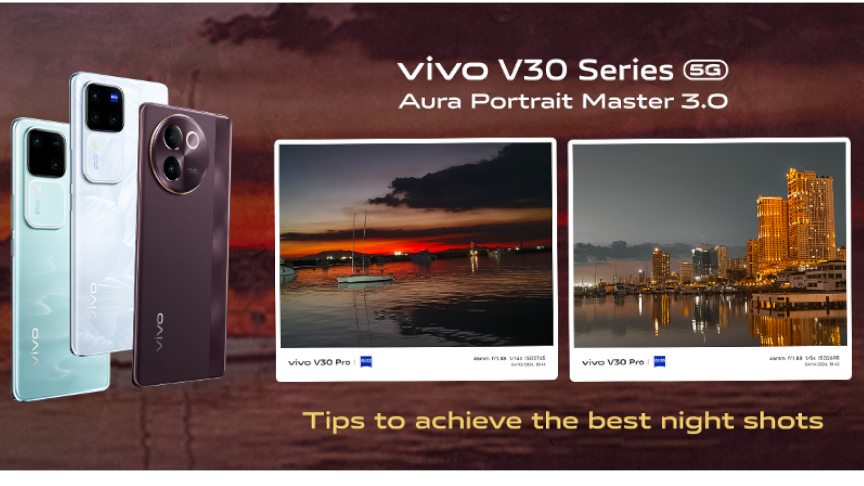
A representative from vivo asked Gab for tips on how to take the best night photos using a mobile phone. Thankfully, vivo released the Aura Portrait Master 3.0 with the vivo V30e as the latest phone in the lineup.
The vivo V30 Pro co-engineered with ZEISS, V30, and V30e are all equipped with powerful cameras that can capture the beauty of the night.
Tips to achieve the best night shots from Gab Mirandilla
Gab listed six (6) simple tips to follow when taking photos during the nighttime. Outdoor photography may seem complicated, especially during the night, but these tips can help you with creative nightography outputs:
- Keep your phone camera lens clean.
It’s important to keep your lenses clean and free from moisture to achieve vivid shots. Whether you are using your vivo V30 Pro, V30, or V30e, you can get clear night shots as long as they are free from dirt. Clean your lenses from unnecessary dirt and particles by using a microfiber cloth, so they won’t be harmed by scratches.
- Enable gridlines to improve composition.
Make sure to turn on the grid lines to help you take photos proportionally. The grids can help align your subjects to get balanced shots, especially during the night. To turn the grid using the vivo V30 5G, when you open your camera, you can check the upper right corner of your phone. Then you can see the Grid lines # in the third row. Check if the button turns yellow to make sure it’s on.
- Adjust exposure using your camera settings before taking a photo.
The vivo V30 Series 5G’s exposure can be adjusted before taking photos to ensure that your pictures are neither too bright nor too dark. To do this, you can simply tap your screen and adjust the brightness by pulling the sun symbol upwards or downwards to check how much light enters your phone camera before clicking the shutter. Adjusting exposure during the night plays a significant role in capturing views and portraits.
- Seek out good lighting, preferably natural and diffused.
It’s important to always find good lighting, especially during the night. But when you are in areas with minimal lights, you can use the Aura Light 3.0 feature of the vivo V30 Series. To turn on Aura Light 3.0, click the flash button on top of your camera on the screen. You can adjust the tone of the light by simply gliding the color palette button below.
- Experiment with various angles for unique shots.
Angles are crucial when it comes to taking the best shots. Think out of the box, use your creativity, or utilize the vivo V30 Series’ 0.6x, 1x, 2x, or 4x to focus on your subjects or if you want to take wide shots. You can check the buttons above the photo to try all angles that suit your perspective to get unique night shots that are worth sharing.
- Utilize the built-in photo editor.
Edit your night shots right away. You can use the vivo V30 Series’ built-in photo editor. Just simply check your shots in your gallery and click the edit button below to modify the framing, adjust the exposure and brightness, add filters, erase unwanted objects, add light effects, or put on bokeh effects. By doing this, you don’t have to go online or download editing apps to make minor adjustments to your night shots.
The vivo V30 Series promises exceptional performance, especially in photography. Capturing stunning night photos is effortlessly achievable with this series.
The V30 Series offers three options:
- vivo V30 Pro with 12GB RAM and 512GB storage for Php 34,999
- vivo V30 with 12GB RAM and up to 512GB storage at the starting price of Php 24,999
- vivo V30e with 8GB RAM and 256GB storage for Php 17,999
You can purchase the vivo V30 Series at vivo concept stores and kiosks nationwide, or through e-commerce platforms like Shopee, TikTok, and Lazada.