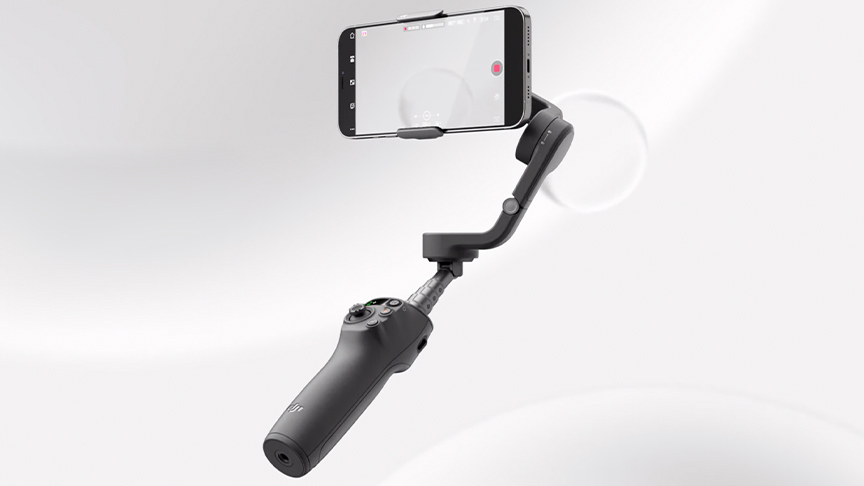
DJI, the world’s leader in civilian drones and creative camera technology, today launches Osmo Mobile 6, a palm-sized, portable device that unlocks the full potential of anyone’s smartphone photos or videos.
The latest addition to the popular Osmo Mobile series, the Osmo Mobile 6 smartphone stabilizer has been enhanced through functions on the device, software features and editing software to give users complete creative control of the phone cameras they carry with them every day. Alongside improved ergonomics and compatibility with larger phones, Osmo Mobile 6 features DJI’s 3-axis stabilization, a brand new Quick Launch and ActiveTrack 5.0.
“Whether you’re outdoors camping with family or at home with a group of friends, everyone wants to explore their creativity and capture the moment in a unique way,” said Paul Pan, Senior Product Line Manager at DJI. “A DJI Osmo Mobile stabilizer is the perfect companion to push the limitations of any smartphone camera and the Osmo Mobile 6 is the best we’ve ever made.”
Portable And Palm-Sized
Osmo Mobile 6 builds on the success of OM 5 with a new ergonomically designed handle and larger clamp to accommodate phones even with cases. It can be carried easily in a pocket and weighs just over 300g. With a built-in extension rod, Osmo Mobile 6 is perfect for achieving better-framed selfies or trying out shots from more interesting angles such as those low to the ground.
Three powerful motors and DJI’s advanced algorithms keep smartphones steady when shooting photos and videos. Osmo Mobile 6’s active stabilization makes it second to none for capturing the action in front of you, from traveling with friends to exploring the city to watching a child’s first sporting event. Smartphones’ electronic image stabilization can falter or lose video quality during more dynamic movement and low lighting situations, but the motorized stabilization of Osmo Mobile 6 makes the difference in every moment.
As Quick As A Flash
Moments that you want to photograph or capture can be fleeting, which is why the Osmo Mobile 6 features a new Quick Launch feature for iPhone users. Once unfolded, attaching an iPhone to the stabilizer automatically triggers the Mimo app alert to enter the camera view instantly. Preparation time is dramatically reduced, with the device up and running three times quicker than previous models.
Stay Locked On
Featuring an enhanced version of DJI’s ActiveTrack, Osmo Mobile 6’s ActiveTrack 5.0 offers more stable tracking at longer distances[1] and also allows the front camera to track subjects that turn to the side or spin. During camping, traveling or street shooting, your footage is made more story-like with the gimbal automatically keeping the subject the center of attention.
As Easy As 1, 2, 3, 4
With a new built-in status panel and Mode button, checking the battery level and switching between the four gimbal modes is as easy as 1, 2, 3, 4. A quick tap on the M button and you can cycle between:
- Follow: In Follow mode, the camera view follows the gimbal’s pan and tilt movements and stays level during rolls. This mode is suitable for shooting up, down, and diagonally.
- Tilt Lock: The camera view only follows the gimbal’s pan movement and stays stable during tilts and rolls — ideal for shooting horizontally or moving around a subject.
- FPV: In FPV mode, all three axes of the gimbal follow the movement of the handle. This is wonderful for dynamic filming of still subjects like landmarks, buildings, or statues.
- SpinShot: Push the joystick to the left or right to control the rotation of the camera view and create dynamic footage. It’s perfect for shooting push, pull, and high-angle shots.
Control With A Roll
Effortlessly and fluidly control zoom and focus with Osmo Mobile 6’s new Side Wheel. Roll the wheel to adjust the focal length for flexible composition and zoom in and out with buttery smoothness. Achieve a cinematic look easily with a press of the side wheel to switch to manual focus control.
Intelligent Features To Make Your Content King
To help make your content the ultimate expression of yourself, Osmo Mobile 6 includes a number of intelligent features:
- Timelapse: Warp time and space with Timelapse, Motionlapse and Hyperlapse. With these three simple templates, beautiful moments can be blended into impressive clips.
- DynamicZoom: Use Move In and Move Out modes to get stretching and compressing visual effects, creating blockbuster footage with just your phone.
- Gesture Control: Snapping a pic or starting a video has never been this convenient. Simple gestures make taking a selfie or a group photo easy.
- Panorama: Three different panorama modes – 3×3, 240°, and CloneMe – are available to help capture those stunning landscapes or unique compositions.
- Story Mode: Various templates help to combine camera movements, transitions, soundtracks and more for users to share eye-catching videos with one effortless tap, or a custom template can be created.
Constructive Apps From Start To Finish
DJI’s own Mimo app, and the officially recommended app LightCut, are both available to guide everyone along their content creation journey.
In DJI Mimo’s camera view, tutorials pop up at the start of many features to get the user up and running in no time. Mimo’s ShotGuides feature automatically recognizes the scenario and recommends a shot sequence, along with a tutorial on how to achieve it.
When it comes to editing, jump quickly from DJI Mimo to the LightCut app, which features AI-powered one-tap editing and a range of exclusive video templates. From shooting to processing, it’s a friendly one-stop solution for new creators and pros alike to get the most from their shots.
Pricing and Availability
DJI Osmo Mobile 6 is available for the retail price of USD $159 and includes a magnetic clamp, tripod, power cable, and storage pouch. It is available for purchase today from store.dji.com and will be available in other channels at a later date.