Apple previewed macOS Mojave, the latest version of the world’s most advanced desktop operating system, with new features inspired by pros but designed for everyone.
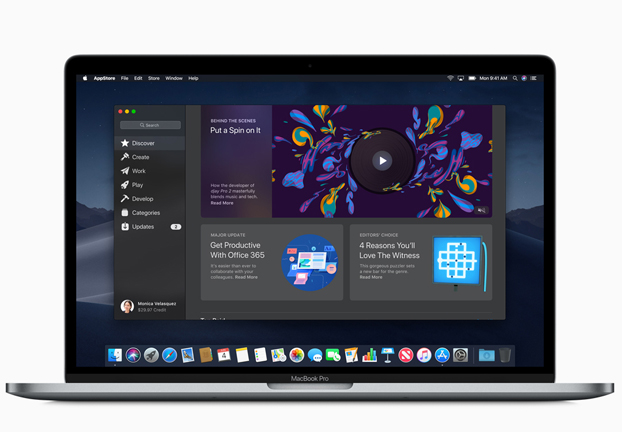
In macOS Mojave, a new Dark Mode transforms the desktop with a dramatic new look that puts the focus on user content. The new Stacks feature organizes messy desktops by automatically stacking files into neat groups. Familiar iOS apps, including News, Stocks, Voice Memos and Home, are now available on the Mac for the first time. FaceTime now adds support for group calling, and the Mac App Store gets a full redesign featuring rich editorial content and the addition of apps from top developers, including Microsoft, Adobe and others.
“macOS Mojave is a major update that introduces powerful new features for a wide range of Mac users, from consumers to pros,” said Craig Federighi, Apple’s senior vice president of Software Engineering. “Dark Mode brings a dramatic new look to macOS that puts your content front and center, familiar iOS apps come to the Mac for the first time and the redesigned Mac App Store makes finding new apps easier and more enjoyable than ever.”
Dark Mode
macOS Mojave users can switch to Dark Mode to transform their desktop to a darkened color scheme, putting the focus on user content while controls recede into the background. Users can toggle between a light and dark desktop, and built-in Mac apps like Mail, Messages, Maps, Calendar and Photos all include Dark Mode designs. macOS Mojave also features a new Dynamic Desktop that automatically changes the desktop picture to match the time of day. An API is available so developers can implement Dark Mode in their apps.
Desktop and Finder
Stacks for the desktop can organize even the most cluttered of desktops by automatically stacking files into neat groups based on file type. Users can customize their Stacks to sort based on other file attributes like date and tags. Finder also gets a significant update in macOS Mojave with an all-new Gallery View that lets users skim through files visually. The Preview Pane now shows all of a file’s metadata, making it easier to manage media assets. Quick Actions allow users to do things like create and password-protect PDFs and run custom Automator Actions on files right from Finder. Quick Look provides a fast, full-size preview of a file, allowing users to rotate and crop images, mark up PDFs and trim video and audio clips without ever opening an app.
News, Stocks, Voice Memos and Home
In macOS Mojave, handy apps including News, Stocks, Voice Memos and Home are now available on Mac for the first time. In the News app, articles, photos and videos look great on the Mac display and users can follow their favorite publications from one app. With Home, Mac users can control their HomeKit-enabled accessories to do things like turn lights off and on or adjust thermostat settings without ever having to step away from their computer. Voice Memos makes it easy to record personal notes, lectures, meetings, interviews and song ideas, and access them from iPhone, iPad or Mac. Stocks delivers curated market news alongside a personalized watchlist, complete with quotes and interactive charts.
Group FaceTime
Group FaceTime makes it easy to chat with multiple people at the same time. Participants can be added at any time, join later if the conversation is still active and choose to join using video or audio from an iPhone, iPad or Mac — or even participate using FaceTime audio from Apple Watch.
All-New Mac App Store
Since its launch in 2011, the Mac App Store has transformed the way users download and install software for the Mac, and today it remains the single largest catalog of Mac apps in the world. In macOS Mojave, the Mac App Store gets a complete redesign with a new look and rich editorial content that makes it easy to find the right Mac app. The new design highlights new and updated apps in the Discover tab, while tabs for Create, Work, Play and Develop help users find apps for a specific project or purpose.
A number of apps from top developers are also coming soon to the Mac App Store, including Office from Microsoft, Lightroom CC from Adobe and more. As always, users can download apps from the Mac App Store with confidence that Apple has approved them for safety and security.
Privacy and Security
As with all Apple software updates, enhanced privacy and security remain a top priority in macOS Mojave. In Safari, enhanced Intelligent Tracking Prevention helps block social media “Like” or “Share” buttons and comment widgets from tracking users without permission. Safari now also presents simplified system information when users browse the web, preventing them from being tracked based on their system configuration.
Safari now also automatically creates, autofills and stores strong passwords when users create new online accounts and flags reused passwords so users can change them. New data protections require apps to get user permission before using the Mac camera and microphone or accessing personal data like user Mail history and Messages database.
Sneak Peek of Developer Framework for Mac Apps
The News, Stocks, Voice Memos and Home apps were brought to Mac using iOS frameworks that have been adapted to macOS. Starting in late 2019, these additional frameworks will make it easier for developers to bring their iOS apps to macOS — providing new opportunities for developers and creating more apps for Mac users to enjoy.
Other New Features
- Screenshots deliver new on-screen controls for easy access to every screenshot option and new video recording capabilities. A streamlined workflow enables easy screenshot sharing without cluttering the desktop.
- Continuity Camera allows Mac users to take a picture or scan a document nearby with their iPhone or iPad and have it appear instantly on their Mac.
- Markup tools are now integrated into Finder, Quick Look and Screenshots, making it fast and efficient to add comments to content and share with others.
Availability
The developer preview of macOS Mojave is available to Apple Developer Program members at developer.apple.com starting today, and a public beta program will be available to Mac users in late June at beta.apple.com. macOS Mojave will be available this fall as a free software update for Macs introduced in mid-2012 or later, plus 2010 and 2012 Mac Pro models with recommended Metal-capable graphics cards. Some features may not be available in all regions or languages.